Showing posts with label PinPoint. Show all posts

Friday, February 27, 2009

GeoUpdater and PinPoint is now Longitude

We renamed our iPhone Geo app from GeoUpdater (boring) to Longitude.
Longitude is an iPhone app that finds your current location emails a map image of your current location. It is available on the iTunes AppStore (check it out here).

Hey, is that not already available in the standard Map app on the iPhone? Not quite! The Map app can only email a link to a google map. Longitude includes an image of the map in the email. We find that more user friendly and hope you will too.

Sunday, December 21, 2008

PinPoint Me New Style Map Emailer for iPhone

jTribe has submitted a new iPhone app to the AppStore. "PinPoint Me" is part of the firepin application family. This little helper application sends a Google Map Image as an email attachment. 

Based on user feedback we re-designed the app to offer a larger map and still offer the simple "two-button" approach.

Enough talk. Here are the screen shots. If you like it please stay tuned and we will announce here once Apple has approved PinPoint Me for sales in the AppStore.


Thursday, December 4, 2008

Enable your Location Services on iPhone


PinPoint and Firepin are not working without the iPhone Location Services enabled.

To enable the Location Services go to your iPhone Settings


Then check that Location Services are switched on. 

Friday, November 21, 2008

PinPoint for iPhone now on AppStore

PinPoint is the latest app in the Firepin family.

It's an easy to use app that lets you find & share the Address of your current location.

Tuesday, November 18, 2008

Questions around PinPoint on the iPhone?

PinPoint on the iPhone answers the question: 

"What is the address of my current location?"

Here are some questions and answers around PinPoint on the iPhone you might find useful:

Why is it asking for my name?
This is so it can personalize your email text. It will use your name and make the email read like this: "John is currently near..."  (replace John with your name).
You will only asked for your name the first time you press the "Share" button. From then on it will use your name each time you share your current address via email. 

How can I change my name?
Click the information button (tiny "i") on the button bar. The info screen displays a button with the label "Edit your name".

Why is the address not correct?
This could be because you try to use in a location where the iPhone GPS cannot get a signal. Usually this is happening in a building (e.g your office or home) or when you in a narrow street. To get the most accurate result you need to ensure that you are outdoors with clear view to the sky. Even without GPS signal we try to get an address. However, this address might not be very accurate or might only contain the suburb without street.

What does the message mean: "(weak signal)"?
It means your iPhone is not getting a GPS signal. Your phone will still be able to find your location based on "cell tower triangulation". However, this will return only vague address information. Usually this will return only the suburb you are in. A message will indicated that the result has only "low accuracy". This happens if you are indoors or in narrow streets.

What does the message mean: "(some signal)"?
It means your iPhone is not getting a GPS signal. Your phone will still be able to find your location based on "Wifi triangulation". The address that will appear is most likely not accurate.  After PinPoint has finished locating you it will show you a message telling you that this result has only "medium accuracy". This happens if you are indoors or in narrow streets.

What does the message mean: "(good signal)"?
Your iPhone's GPS is working fine and you can expect an accurate address result.
This is what you can expect when you are outdoors with clear view to the sky.
 
Why is this message popping up "Traveling? Try Firepin trip tracker"?
Finding a location can take up to 30 seconds. So we thought you might want to get some information about other applications form us. Firepin is a trip tracker and as a PinPoint user you might be interested in this free app. (Firepin download informationHow to use Firepin Trip Tracker)
 

Monday, November 17, 2008

PinPoint on iPhone is coming

When you want to let someone know what your current address is then PinPoint has the answer.

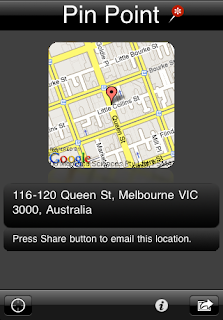
PinPoint locates you, shows a map and the current ADDRESS. Within seconds you can tell or email someone your address along with an image of the map and the link to Google maps.

PinPoint for iPhone extends the Firepin product family and offers useful features that are different.

PinPoint is non-technical: No need to deal with longitude and latitude

PinPoint returns real ADDRESS: Converts the location into a readable address

PinPoint is not a map application: But includes a small map for fast response

PinPoint gives visual, textual and vibration feedback after it finished finding the address.

You can use PinPoint to:
- Let someone know where to meet
- Email an address to yourself to keep a record
- Let your partner know how far you are away from home
- Find out the Post Code of your current location

So, PinPoint should be ready for download from the AppStore in a couple a days. We are currently waiting for Apple to review the app.

Wednesday, October 29, 2008

PinPoint - A simple way to send someone your current location

PinPoint is the latest addition to the FirePin family currently now on the Android platform.


It is a simple way to send someone your current location.

- PinPoint finds your current location and shows you on a map


- You select an email address from your contact list

- They receive your approximate address and a map which they can click to take them to google maps

Get it now from the Android Market Place!