Showing posts with label iPhone. Show all posts

Tuesday, April 28, 2009

Firepin v 1.3.1 is out - sharing works again

The new version 1.3.1 is now available in the AppStore http://tinyurl.com/firepin.

We highly recommend to upgrade.
The new version of firepin for the iPhone includes essential bug fixes.
  • share your trip immediately form the iPhone
  • view your trips in the iPhone Maps app
Tips around Trip Sharing
Did you know that sharing works per trip?

For each trip you can decide whether you want to share or not.
  • A new trip can only be seen by you.
  • You can share the current trip anytime form the iPhone
  • You can share any trip via our web site from a PC or Mac
  • You can disable sharing for any trip via our web site from a PC or Mac
Further trip management features are available when using http://firepin.com with a desktop browser (e.g. Firefox).

Friday, March 6, 2009

Firepin's Approach to total Privacy

With almost 3 Million Geo locations stored in the firepin database we take privacy very serious. 

One obvious concern with Firepin trip tracking is that police or government organisations could use the data to track the user down or to see where they have been.

We have thought about that problem hard and long  right from the start and we came up with a great approach to keep protect users privacy. 

Firepin keeps no personal data. 

There is no way that we or anyone else could link back to the the user based on the data that is stored in the firepin database. 

Firepin's approach to ensure total privacy:
  1. We don't keep a login or email
  2. We don't store any personal data - there is no need to
  3. Our "No Sign-Up Approach" means we don't store any user logins
Power to the user:
  1. The Firepin app gives you access to all your recorded track.
  2. Firepin must be installed on the device to authenticate on the website
  3. Only the phone user can login to Firepin to see their maps or trips
  4. Even if another person would get access to a users firepin account they would not be able to find out the user's identity
  5. If Firepin gets uninstalled the link between your maps/tracks and yourself gets broken and there is no trace back possible.
  6. The user decides how much they want to make their tracks public on their blog or website
We don't collect user data we collect geo data.


Friday, February 27, 2009

GeoUpdater and PinPoint is now Longitude

We renamed our iPhone Geo app from GeoUpdater (boring) to Longitude.
Longitude is an iPhone app that finds your current location emails a map image of your current location. It is available on the iTunes AppStore (check it out here).

Hey, is that not already available in the standard Map app on the iPhone? Not quite! The Map app can only email a link to a google map. Longitude includes an image of the map in the email. We find that more user friendly and hope you will too.

Sunday, December 21, 2008

PinPoint Me New Style Map Emailer for iPhone

jTribe has submitted a new iPhone app to the AppStore. "PinPoint Me" is part of the firepin application family. This little helper application sends a Google Map Image as an email attachment. 

Based on user feedback we re-designed the app to offer a larger map and still offer the simple "two-button" approach.

Enough talk. Here are the screen shots. If you like it please stay tuned and we will announce here once Apple has approved PinPoint Me for sales in the AppStore.


Thursday, December 4, 2008

Enable your Location Services on iPhone


PinPoint and Firepin are not working without the iPhone Location Services enabled.

To enable the Location Services go to your iPhone Settings


Then check that Location Services are switched on. 

Tuesday, December 2, 2008

1 Million Geo Locations in Firepin

Wow, we are very impressed with the speed and volume of Geo Locations hitting our server. 

Yesterday the 1 Million mark was reached. Yes, more than 1,000,000 locations are now stored on the firepin server within just over a month.

This is very encouraging for us and we will see how we can keep this service free for our loyal users.

Thanks to all our users out there using Firepin Trip Tracker on the iPhone or Android G1 phone!

Friday, November 21, 2008

PinPoint for iPhone now on AppStore

PinPoint is the latest app in the Firepin family.

It's an easy to use app that lets you find & share the Address of your current location.

Tuesday, November 18, 2008

Questions around PinPoint on the iPhone?

PinPoint on the iPhone answers the question: 

"What is the address of my current location?"

Here are some questions and answers around PinPoint on the iPhone you might find useful:

Why is it asking for my name?
This is so it can personalize your email text. It will use your name and make the email read like this: "John is currently near..."  (replace John with your name).
You will only asked for your name the first time you press the "Share" button. From then on it will use your name each time you share your current address via email. 

How can I change my name?
Click the information button (tiny "i") on the button bar. The info screen displays a button with the label "Edit your name".

Why is the address not correct?
This could be because you try to use in a location where the iPhone GPS cannot get a signal. Usually this is happening in a building (e.g your office or home) or when you in a narrow street. To get the most accurate result you need to ensure that you are outdoors with clear view to the sky. Even without GPS signal we try to get an address. However, this address might not be very accurate or might only contain the suburb without street.

What does the message mean: "(weak signal)"?
It means your iPhone is not getting a GPS signal. Your phone will still be able to find your location based on "cell tower triangulation". However, this will return only vague address information. Usually this will return only the suburb you are in. A message will indicated that the result has only "low accuracy". This happens if you are indoors or in narrow streets.

What does the message mean: "(some signal)"?
It means your iPhone is not getting a GPS signal. Your phone will still be able to find your location based on "Wifi triangulation". The address that will appear is most likely not accurate.  After PinPoint has finished locating you it will show you a message telling you that this result has only "medium accuracy". This happens if you are indoors or in narrow streets.

What does the message mean: "(good signal)"?
Your iPhone's GPS is working fine and you can expect an accurate address result.
This is what you can expect when you are outdoors with clear view to the sky.
 
Why is this message popping up "Traveling? Try Firepin trip tracker"?
Finding a location can take up to 30 seconds. So we thought you might want to get some information about other applications form us. Firepin is a trip tracker and as a PinPoint user you might be interested in this free app. (Firepin download informationHow to use Firepin Trip Tracker)
 

Monday, November 17, 2008

PinPoint on iPhone is coming

When you want to let someone know what your current address is then PinPoint has the answer.

PinPoint locates you, shows a map and the current ADDRESS. Within seconds you can tell or email someone your address along with an image of the map and the link to Google maps.

PinPoint for iPhone extends the Firepin product family and offers useful features that are different.

PinPoint is non-technical: No need to deal with longitude and latitude

PinPoint returns real ADDRESS: Converts the location into a readable address

PinPoint is not a map application: But includes a small map for fast response

PinPoint gives visual, textual and vibration feedback after it finished finding the address.

You can use PinPoint to:
- Let someone know where to meet
- Email an address to yourself to keep a record
- Let your partner know how far you are away from home
- Find out the Post Code of your current location

So, PinPoint should be ready for download from the AppStore in a couple a days. We are currently waiting for Apple to review the app.

Wednesday, November 5, 2008

How to keep GPS on while iPhone is on standby

Your iPhone is switching off GPS as soon as you put your phone in standby mode. This is a measure by Apple to conserve battery. As a side effect users of GPS trackers like Firepin Trip Tracker will not be able to record accurate locations when in standby mode.

Using a car charger will keep the GPS on even in standby mode. An extended battery pack will keep the GPS running too. But what if you are walking or running and want to use Firepin to record your trip in best possible accuracy?

Here is a trick we found to keep your GPS running even when your iPhone is in standby mode.
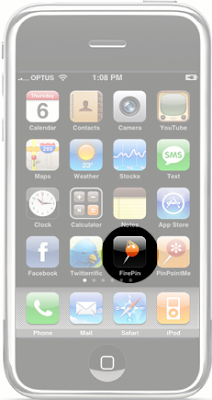
  1. Launch Firepin Trip Tracker on the iPhone
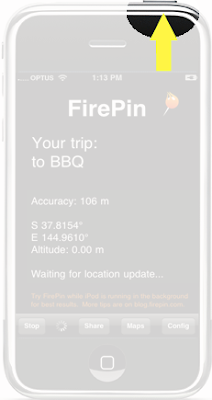
  2. Start tracking
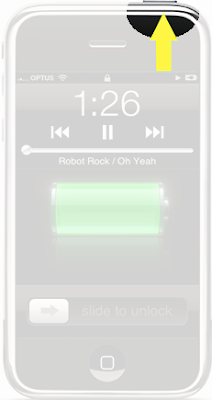
  3. Lock the screen
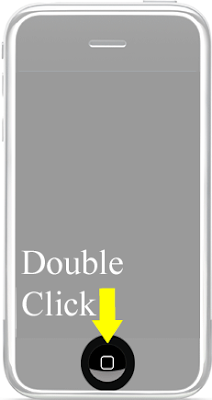
  4. double press Home button on your iPhone
    (iPod player control will pop up. Did you know that?)
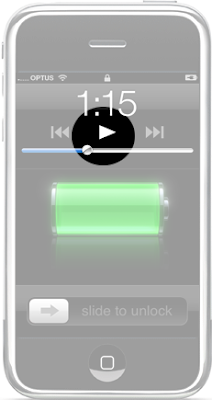
  5. Press play
  6. Reduce volume if you don't want to listen to music
  7. Lock the screen again
Voila, now GPS is working even your phone is locked.
Chuck your iPhone in your pocket and Firepin will record your trip with best accuracy.

Sounds complicated? Once you are used to the little trick it is easy to use. The result is worth the effort.

Here is the how you enable background GPS in pictures:


Tuesday, October 14, 2008

Sending a Trip Map to Twitter from your iPhone

Are you using Twitterrific on the iPhone? It's a great twitter app. Besides twitter browsing and posting, it allows you to send your current location to twitter. But how about putting a whole trip into twitter

Here in the office we like twitter. That's why we came up with the simplest possible solution to send any trip ever made with FirePin to twitter conveniently from the iPhone. 

Check out the new twitterrific button in FirePin.

Twitter a FirePin trip:
Until now it was too hard! "Select a trip, share it via email to yourself, copy the link, create a tinyurl, open twitter and paste the link."
From today it's easy to share a trip on twitter from your iPhone. We have released a brand new FirePin feature that does all the work for you and integrates nicely with twitterrific.
  1. On your iPhone click the "Maps" button in FirePin.


  2. Select a trip you want to add to twitter.


  3. Press the twitterrific button.


  4. Twitterrific app launches with a tinyurl link to your shared trip. -: Done!


You can download twitterrific for free from the AppStore so you can enjoy this new feature.

Friday, October 10, 2008

An iPhone 3G app that is different

jTribe has finished its first iPhone application. It's called FirePin and is a simple iPhone app that allows a user to track trips. 

We have chosen a minimalist approach and tried to avoid things that we found annoying on other iPhone apps.

Yes it is yet another tracking app. But this one is different. This is not a hard core GPS tracking system. It is about letting other people know where you are on a trip. Sharing and protection were the key design goals of the app.

Introducing our "no sign-up"approach

When the iPhone came out I ended up with 5 new user accounts on the Internet and stopped using apps that ask me to sign-up. Our app does not required the user to sign-up. Install and use it straight away.

"no sign-up" and still protected

The location data that is send to our FirePin location store is kept anonymous. It is impossible (even for us) to conclude who has submitted locations.

Power to the iPhone user

The user can manage and control all data from the iPhone. 
  1. Creating new trips, 
  2. sharing trips with friends and family, 
  3. accessing trip history and 
  4. displaying trips in the iPhone Map application.
However, access through  a non-iPhone web browser is also possible and supported and offers some more advanced feature such as post-editing trips interactively in our integrated Google Maps application. 

We are using it too

The jTribe folks (who are owners of an iPhone) are using FirePin too. Our first-time users thought: "Why should I use this app?" But then we found heaps of useful things we could do with it and it became kind of addictive. 

Things to do with FirePin
  1. Letting our partners know how far we away from home.
  2. Sharing our holiday trips.
  3. Letting coworkers know how far we away (when stuck in traffic and running late for a meeting).
  4. Record outdoor activities such as running, bike riding, hiking (not swimming).
  5. Mark a fishing trip and keep it for later reference.
  6. Share a trip with family members so they can track you on your way to a family gathering.
We hope that other iPhone users find it as useful as we do.

Ah yes, and it's actually free!

Friday, October 3, 2008

FirePin v1.0 ready for Apple AppStore.

After weeks of team discussions, heaps of trips to get test data by driving around in cars, trains, bikes, and on rollerblades. After weeks walking around in the office or around the office building - annoying our co-workers at the OpenHub. After visiting remote areas of Australia. After a lot of fun developing the FirePin service and iPhone Application we decided that it is time to show FirePin to the rest of the world by putting it in the Apple AppStore. 

Here is what you will see in the AppStore Description:

FirePin uses integrated location services to record any trips you make with your iPhone.

Your path is shown as a series of pins on the iPhone’s built-in google map, and is also accessible on the web.

Why is FirePin different?

1: FirePin is simple, non-technical and does exactly what it claims to do.

2: Quick start: just name your trip and press go.

3: Trips are stored online and securely web accessible but NO registration is required, providing complete anonymity.

4: Share trips easily and instantly from the iPhone, allowing a friend and family to monitor your progress.

5: This app and all updates will remain free until iPhone’s ‘push’ functionality is enabled by Apple. Even then we will look after our early users.